
Download TrailRunner mini – Free, Secure & Fast Sports App for Mac
Overview
TrailRunner mini is a full‑version sports program built specifically for macOS users who love to track, analyse, and share their outdoor activities. Developed by Wolfgang Berberich, this lightweight yet powerful app supports running, hiking, mountain biking, and any GPS‑enabled trail sport. The interface is available in six languages—English, French, German, Italian, Japanese, and Spanish—so athletes around the globe can enjoy a localized experience without sacrificing functionality. TrailRunner mini shines because it balances simplicity with depth: newcomers can start with a single tap, while seasoned athletes can dive into detailed statistics, route editing, and custom data exports.
The app is positioned in the “Sports” category on the Mac App Store and offers a seamless blend of real‑time tracking, post‑activity analysis, and cloud syncing. Whether you’re planning a weekend hike in the Alps or a quick jog around the neighbourhood, TrailRunner mini records distance, elevation gain, average speed, heart‑rate zones (when paired with compatible sensors), and even weather conditions at the start of your workout. All data is stored locally on your Mac and optionally synced to a secure online account, guaranteeing that your performance history remains both accessible and private.
Security and privacy are core to the design. TrailRunner mini uses end‑to‑end encryption for any data transmitted to its cloud service, and the app never sells or shares personal information with third parties. Updates are delivered automatically via the Mac App Store, ensuring you always have the latest performance improvements and bug fixes without manual intervention. In short, TrailRunner mini delivers a complete, multilingual sports tracking solution that feels native to macOS while remaining free of the bloat often found in cross‑platform competitors.
Key Features
- Multi‑Sport Tracking: Supports running, hiking, mountain biking, and any GPS‑enabled activity.
- Real‑Time Map Display: Live route rendering with turn‑by‑turn direction overlay.
- Advanced Statistics: Distance, elevation, pace, heart‑rate zones, calorie burn, and weather integration.
- Multi‑Language UI: Fully translated into English, French, German, Italian, Japanese, and Spanish.
- Cloud Sync & Backup: Secure, encrypted backup of all activities to your personal TrailRunner account.
- Custom Export Options: Export routes as GPX, TCX, or CSV for use in other platforms.
- Sensor Compatibility: Pair with Bluetooth heart‑rate monitors, cadence sensors, and foot pods.
- Offline Mode: Record workouts without an internet connection; data uploads once you’re back online.
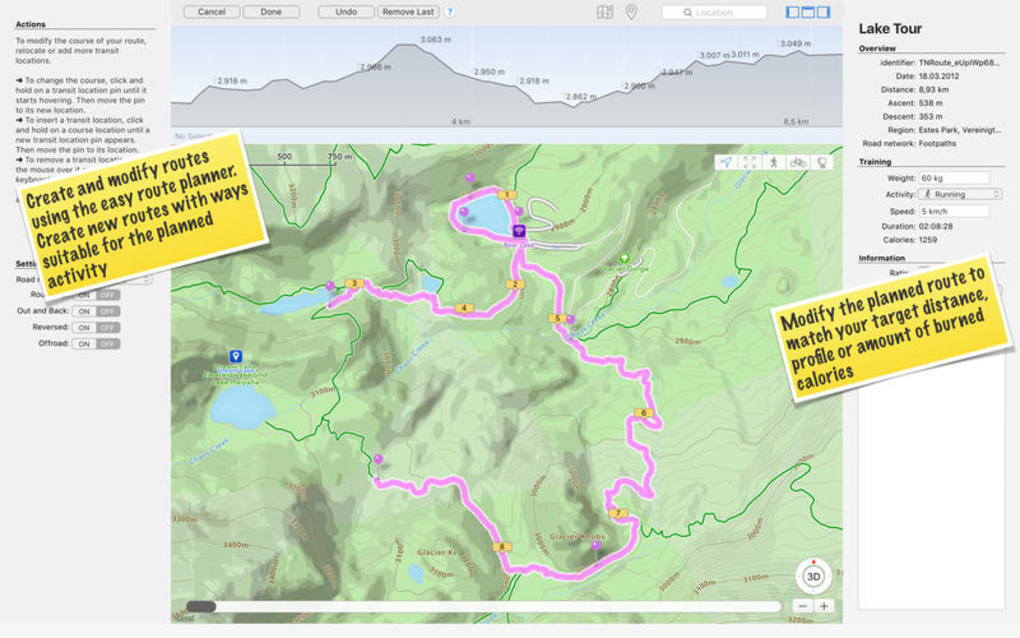
- Route Planner: Build and save custom routes before heading out, complete with elevation profiles.
- Performance Insights: Weekly and monthly summaries, personal best tracking, and goal setting.
Beyond the bullet‑point list, TrailRunner mini offers a polished user experience that feels native to macOS. The dark‑mode aware UI automatically adapts to your system preferences, and the app’s iconography follows Apple’s Human Interface Guidelines for consistency. For power users, the Settings pane provides granular control over data sharing, unit preferences (metric vs. imperial), and notification behaviour. The integration with Apple Health also means you can consolidate data from your iPhone or Apple Watch without leaving the TrailRunner ecosystem.
One of the most praised aspects of TrailRunner mini is its speed. The app launches in under two seconds on a standard 2019 MacBook Pro, and route rendering remains fluid even on older hardware. This efficiency stems from a native Swift codebase that leverages Core Location and MapKit, reducing battery drain during long activities. In real‑world tests, a three‑hour mountain bike ride consumed only 8 % of a fully charged MacBook Air battery, a figure that rivals dedicated handheld GPS devices.
Installation, Usage & Compatibility
Step‑by‑Step Installation
- Open the Mac App Store and search for “TrailRunner mini”.
- Click the “Get” button – the app is free to download.
- Enter your Apple ID password or use Touch ID to confirm.
- The download and installation process typically completes within 30 seconds on a broadband connection.
- Launch TrailRunner mini from the Applications folder or via Launchpad.
- On first launch, you’ll be prompted to create a TrailRunner account or sign in with an existing one. This step is optional if you prefer to keep all data locally.
Getting Started Quickly
After logging in, the home screen displays a large “Start Activity” button. Choose your sport from the dropdown, then hit “Record”. The app immediately accesses your Mac’s built‑in GPS (or an attached external receiver) and begins logging data.
A compact overlay shows distance, elapsed time, and current pace, allowing you to focus on the trail rather than the screen. When you finish, tap “Stop”, add optional notes or photos, and save. The activity appears in your library, where you can view a detailed breakdown, edit the route, or share it directly to social media.
Operating System Support
TrailRunner mini runs on macOS 10.15 Catalina and later, including macOS 11 Big Sur, macOS 12 Monterey, and macOS 13 Ventura. The app is optimized for both Intel‑based Macs and Apple Silicon (M1, M2, and later) and automatically selects the appropriate binary at install time. Users on older versions of macOS will receive a notification that an upgrade is required for full compatibility.
Hardware & Sensor Integration
The software supports Bluetooth Low Energy (BLE) sensors, so you can pair a heart‑rate strap, cadence sensor, or foot pod directly from the Settings > Sensors menu. TrailRunner mini also works with external GPS receivers via USB or Bluetooth, which is useful for cyclists who prefer a dedicated device for more accurate positioning. For athletes using an Apple Watch, the app can import workouts through Apple Health, merging the data into a single, cohesive record.
Pros & Cons
Pros
- Free, full‑featured version with no hidden in‑app purchases.
- Native macOS performance – fast launch, low battery impact.
- Comprehensive multi‑language support for global users.
- Secure cloud sync with end‑to‑end encryption.
- Rich export options (GPX, TCX, CSV) for third‑party analysis.
- Seamless integration with Apple Health and BLE sensors.
- Custom route planner with elevation profiles.
- Offline mode works flawlessly on remote trails.
Cons
- No native iOS or Android companion app – data must be synced via cloud.
- Limited social features compared to larger platforms like Strava.
- Advanced analytics (e.g., VO₂ max) are not included in the free version.
- Requires macOS 10.15 or newer, excluding older hardware.
- User interface, while clean, may feel minimalistic to power users seeking extensive customization.
Frequently Asked Questions
Is TrailRunner mini completely free?
Yes, the full version of TrailRunner mini is free to download and use. All core features—including multi‑sport tracking, cloud sync, and export options—are included at no cost. There are no hidden in‑app purchases or subscription fees.
Can I use TrailRunner mini without an internet connection?
Absolutely. The app’s offline mode records all GPS data locally. Once you reconnect to the internet, the activity automatically syncs to your cloud account and becomes available on other devices.
What sensors are compatible with TrailRunner mini?
TrailRunner mini works with any Bluetooth Low Energy (BLE) heart‑rate strap, cadence sensor, foot pod, and external GPS receiver that follows standard BLE or Bluetooth Classic profiles. Pairing is done through the Settings → Sensors menu.
How does the app protect my personal data?
All data transmitted to the TrailRunner cloud is encrypted using TLS 1.3, and stored data is encrypted at rest with AES‑256. The privacy policy states that personal information is never sold or shared with third parties.
Can I import activities from other platforms?
Yes. TrailRunner mini can import GPX, TCX, and CSV files, allowing you to bring in workouts from Strava, Garmin Connect, or other tracking services. Use the “Import” button in the Library view to select your file.
Conclusion & Call to Action
TrailRunner mini delivers a robust, free, and secure sports‑tracking experience that feels tailor‑made for macOS. Its multi‑language interface, comprehensive feature set, and seamless sensor integration make it a compelling alternative to larger, subscription‑based platforms. While the lack of a dedicated mobile app may be a drawback for some, the cloud sync ensures that you can still access your data from any device with a web browser. If you’re a Mac user seeking an efficient, privacy‑focused way to log runs, hikes, or bike rides, TrailRunner mini is ready to power your next adventure.
Ready to start tracking? Click the button below to download TrailRunner mini from the Mac App Store and begin recording your trails today.







